
Sometimes all of the line items are out of stock, or the order consists of one line item that is out of stock. In these cases, the entire order should be cancelled.
Important – An order that has been Received in Hub or shipped cannot be cancelled. Orders can be cancelled when their status is Received by Global-e. Any cancelled order will be filtered out of the reports. An automatic refund will be issued for every order cancellation for the full order amount or captured amount.
Cancelling the order via the Global-e Admin will:
- Trigger an automatic and full order refund
- Send an email to the customer notifying him about the cancellation
In order to cancel an order:
- Locate an order (see par. 4)
- Scroll to the bottom of the page and click Cancel Order
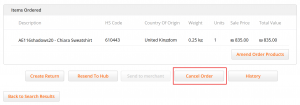
- A confirmation pop-up appear
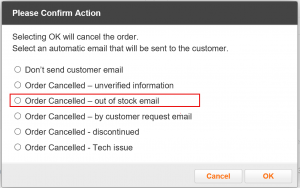
- Select Order Cancelled – out of stock email. This will ensure that an email is sent to the customer notifying him about why the order was cancelled