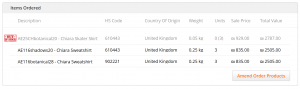
If there are any out of stock items in the order, it will need to be amended prior to printing the AWB and export documents. Amending the order via Global-e Admin will:
- Trigger automatic refund of all the relevant amounts
- Update export documents
- Update shipper’s AWB
- Send an email to the customer notifying them of out of stock items and refunds
In order to amend the order:
- Locate the relevant order
- Scroll down to Items Ordered at the bottom of the page – all the order line items and quantities will be shown
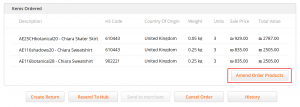
This button will only appear before the order is processed for dispatch, i.e. before it receives the status Received in Hub.
- Select Amend Order Products. All product quantities will become editable. Please note that you can only reduce the quantity of an item. Once the quantity of an item is reduced and saved, it is a permanent change and you will no longer be able to increase the quantity to the former amount
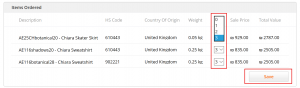
- Update the relevant line item quantity and select Save. The Updated Order Details confirmation pop-up will appear. It will indicate the original amounts paid by the customer and the amounts after the order was amended. In addition, the refund amount will be shown
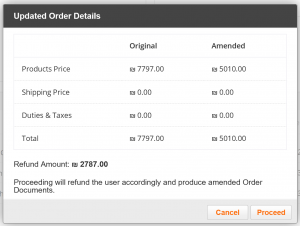
- Select Proceed to confirm the action, or Cancel to close down the confirmation pop-up without amending order quantities
- The amended item and new quantities will be clearly indicated. The updated quantity will be shown under Units with the original quantity shown in parentheses ()